
PrepperBox: How I Built My Own Offline Internet-in-a-box.
I almost spent $279 on a Prepper Disk. Instead, I spent about 40 hours building something considerably more personal.
A while back, an advertisement for something called the Prepper Disk found its way into my algorithm.
The idea immediately got my attention.
It was essentially a tiny offline internet built around a Raspberry Pi. Plug it into power, connect your phone to the Wi-Fi network it creates, and suddenly you have access to Wikipedia, maps, medical information, repair guides, survival material and a pretty impressive collection of other resources without needing cell service or an internet connection.
I spend enough time in places where those things disappear that I could immediately see the appeal.
Then I saw the price.
$279.
At the time, my first reaction was that it seemed pretty exorbitant for a Raspberry Pi in a little aluminum box. More importantly, it didn't have everything I'd want in a device like this.
That first impression turned out to be a little unfair.
I know that now because I've spent about 40 hours building my own.
But back then, I did what any curious outdoorsman would do and took a trail I'd never been down before: I decided to build one myself and turned an otherwise reasonable purchase into several weeks of tinkering.
The Idea
I want to give the people at Prepper Disk some credit here, especially because I've never actually used one.
I can't review how well their finished product performs in the field, and I'm not going to pretend I can. What I can say is that after building my own version of the same basic idea, I understand their product and its price a lot better than I did when that advertisement first showed up.
The current Prepper Disk Premium is built around a Raspberry Pi 4B with 2GB of RAM and 512GB of storage. It creates its own Wi-Fi network and comes preloaded with Wikipedia, medical resources, repair information, maps, books, survival material, amateur-radio information and quite a bit more. It can serve that information to multiple devices without an internet connection.
More importantly, somebody else has already done the work.
The files have been downloaded and organized. The Wi-Fi network has been configured. The interface has been built. The system has been tested. Updates and support are available, and the finished product comes with a warranty.
Apparently, you plug it in, connect and use it.
After building one myself, I no longer consider that a small distinction.
But I wasn't looking only for an emergency encyclopedia.
I wanted information and entertainment.
I wanted my own music library. I wanted movies. I wanted actual offline navigation rather than simply looking at a downloaded map. I wanted books and manuals. I wanted a local AI that could still be useful without reaching out to a server somewhere.
And if I was going to carry this thing into the woods, I wanted the interface to feel like something I actually enjoyed using.
Mostly, though, I wanted to know if I could build it.
Could I take the basic idea that Prepper Disk introduced me to and personalize it completely around what I wanted?
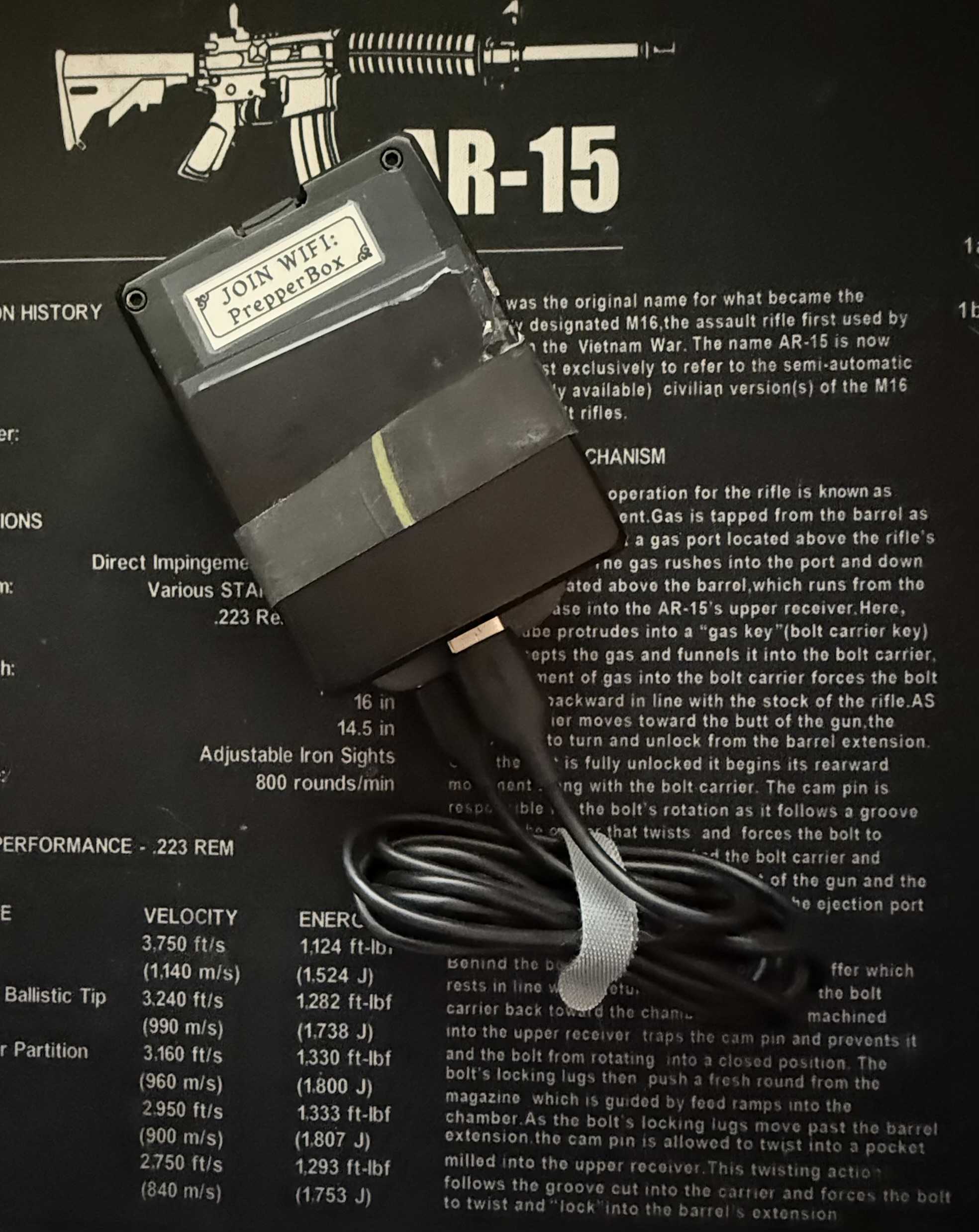
That question eventually became my version, called the "PrepperBox."
What's Inside the Box
I didn't build mine around the same hardware as Prepper Disk.
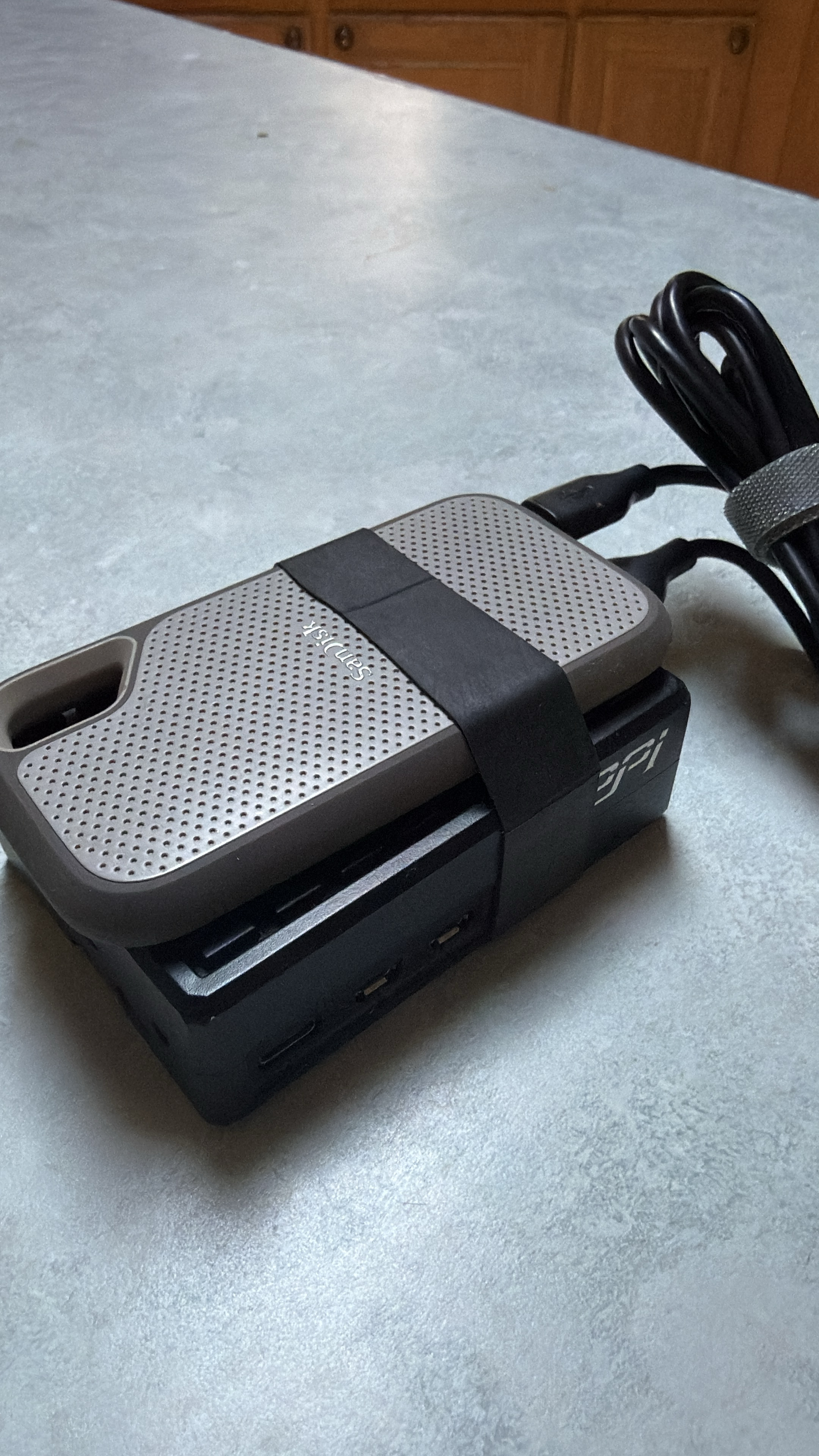
At the center of my version is a Raspberry Pi 5 with 16GB of RAM, a 2.4 GHz quad-core little computer with considerably more horsepower than I probably would have chosen if all I wanted to do was serve Wikipedia.
Storage comes from a 1TB drive that I already owned, with a 64GB microSD card handling the Pi side of things. The Raspberry Pi lives inside a GeekPi aluminum case with cooling columns and thermal pads and is powered by a 27-watt Raspberry Pi power supply.
The computer itself is small enough to fit in a pocket of a backpack or jacket. All in, including the 1TB SSD, the unit weighs 10.8 ounces (308 grams) and is 2.5 inches wide x 3.5 inches long x 1.5 inches thick.
Power is the bulkier part on trail, but it will work with a 10,000 mAh power bank such as the Nitecore NB10000 Gen 4.
In the field I generally use either an Anker Prime 26,500 mAh power bank or, when weight isn't particularly important, my Jackery Explorer 1000.
The Anker can run PrepperBox overnight and still have roughly half its battery remaining the following morning. Connected to the Jackery, runtime becomes something measured in days rather than hours.
I didn't build this to be an ultralight backpacking computer. I built it around capability.
Forty Hours and a Lot of Copying and Pasting
When I started this project in late December 2025, my coding knowledge was pretty limited.
There were guides available online for projects such as Kiwix, and I could follow instructions, but I wasn't sitting down with years of Linux administration and web-development experience and designing the whole thing from memory.
Instead, I used AI heavily during development.
My part of the conversation usually sounded something like:
"Here's what I want it to do."
AI helped translate that into architecture, code and commands. I physically assembled everything, installed it, ran commands, tested the result and reported back when something inevitably didn't behave the way we expected.
Then we'd troubleshoot it and try again.
That loop accounted for most of the work.
I'd estimate I've put about 40 hours into PrepperBox so far, mostly a couple of hours at a time over several weeks, with improvements continuing long after the original build was functional.
There were technical glitches along the way. Services broke. Networking occasionally became temperamental. The AI could be slow. Something that sounded simple could turn into a long evening of troubleshooting.
But eventually the thing I had pictured in my mind started appearing on my phone.
And this is probably where I gained the most appreciation for Prepper Disk.
You're not paying $279 for the dollar value of a Raspberry Pi and an SD card. You're paying somebody else to have already spent the evenings doing all of this. Working out the kinks. Dealing with the headaches that inherently exist with technology.
The Part I Didn't Want to Look Like a Raspberry Pi Project
Function wasn't enough.
From what I could see online, the Prepper Disk interface appeared utilitarian. That's not necessarily a criticism. Its job is to make a huge amount of useful information available when the normal ways of reaching that information don't work.
I wanted to take my version in a different direction.
I didn't want PrepperBox to feel like I was browsing a server or digging through somebody's collection of folders.
If I opened my movies, I wanted it to feel like a movie service.
If I opened music, I wanted it to feel like a music app.
So the user interface became a significant part of the project.
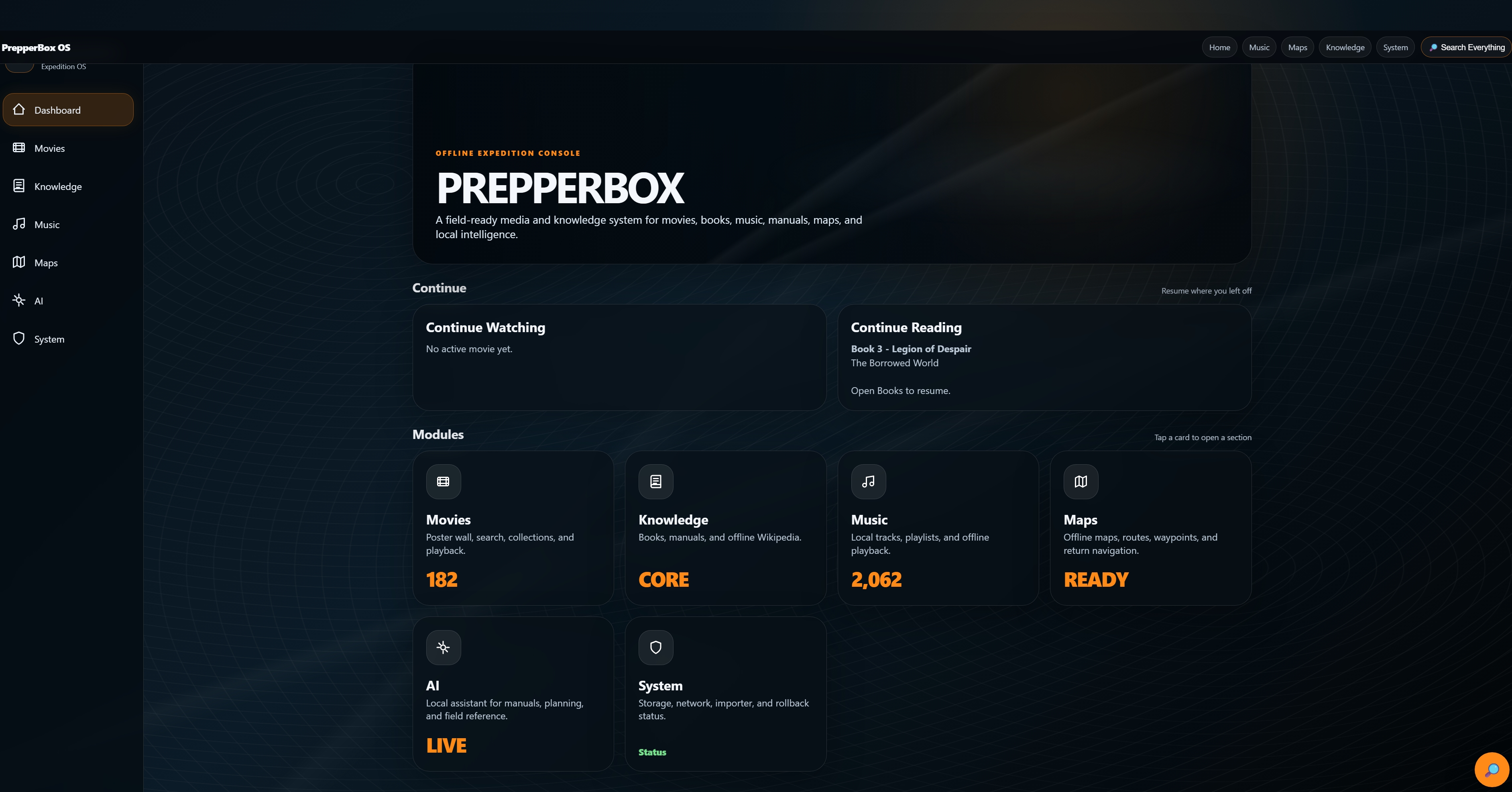
My movie library uses a Netflix-style presentation, complete with poster artwork, descriptions and metadata. My music library takes cues from Apple Music, with playlists and playback rather than simply presenting a directory full of MP3 files.
Books have their own library. Maps look and behave like maps.
The underlying services may be technical, but using them shouldn't require thinking about the technology underneath.
That became one of the basic rules of PrepperBox:
The interface should expose what I want to do, not how the server does it.
What's On It Now
PrepperBox has grown considerably since those first experiments.
There are currently about 200 movies stored locally. These are movies I've owned and made images from for my own collection.
And they're not just video files sitting in folders.
I built a Windows Companion application for maintaining the library. When I'm at home with an internet connection, the Companion can scan movies, associate them with records from TMDb, download the appropriate poster artwork and metadata, and let me correct a match when it gets one wrong.
Once that information is stored, TMDb is no longer necessary.
Take PrepperBox into the mountains and the posters, descriptions, titles and movies are all still there.
The same basic philosophy applies throughout the system.
My music library currently contains around 1,500 songs, with local playback and playlists.
There's an offline book library for EPUBs and PDFs.
There are hundreds of manuals and reference documents.
There's a complete offline copy of Wikipedia served through Kiwix.
And then there are the maps.
These Aren't Just Downloaded Maps
This was important to me.
A downloaded map that can show a GPS dot is useful. But that's not what I wanted.
PrepperBox runs its own Valhalla routing engine.
That means routing calculations happen on the little computer sitting beside me.
I can select a destination and PrepperBox can calculate the route, distance, estimated travel time and turn instructions locally. It doesn't send a request to Google Maps. It doesn't wait for cell service.
There isn't any.
The system also handles GPS or manual positioning, saved destinations and GPX tracks. I've loaded useful locations including campsites and hot springs, along with HAM and GMRS repeater locations and frequency information.
It's the kind of mapping system I actually wanted for exploring backroads rather than simply something I could point to and say, "Look, it has maps."
There's an AI in There, Too
The onboard AI is probably one of the more unusual parts of PrepperBox.
I'm not trying to recreate ChatGPT without an internet connection. A Raspberry Pi sitting in my pack isn't secretly running a data center.
Instead, local AI gives me another way to interact with the information and capabilities I've brought with me.
The interface has General, Wiki, Media and Auto modes.
I can ask general questions offline, interact with locally stored information and use the broader interface to get at things such as Wikipedia and reference material. It also understands requests involving local media, including finding or opening music and movies by title.
The important part isn't that I can say there's "AI" on the box.
It's that the interface remains useful when there isn't another computer somewhere on the internet answering for it.
Does It Actually Work in the Woods?
Yes.
And one camping trip provided a considerably better test than anything I could have done sitting at my desk.
A buddy and I were camping together earlier this summer at Devil's Punchbowl in the Klamath Mountain Range of Northern California, miles away from "service." Eventually, as night came we retired to our separate tents and both connected our phones to the PrepperBox.
For whatever reason, I chose to begin watching a horror movie.
He chose a completely different movie; a comedy. (Probably the better decision)
Both streamed simultaneously from the same little box.
At some point I could hear him laughing from his tent while I was lying in mine second guessing my decision and wishing I had opted for a movie that induced laughter. (I turned on something else soon thereafter).
All that to say, it worked. That was my multi-user load test. And it's been further tested with even more users on subsequent excursions.
And as proud as I am with myself for building it on my own, my son is considerably less impressed by all of this.
To him, apparently, having a couple hundred movies, 1,500 songs, Wikipedia, offline navigation and a local AI running from a little aluminum box in the middle of nowhere is simply standard operating procedure when he goes outside with Dad.
Plug It In
The field experience was deliberately designed to be boring.
That's a compliment.
I connect PrepperBox to a power bank.
It boots and creates its own Wi-Fi network.
Within roughly 30 seconds to a minute, I connect my phone and navigate to the prebuilt address using my browser.
That's it.
I don't manually start a map server. I don't SSH into the Pi. I don't launch the movie database from a terminal.
The necessary components run as system services and the web interface ties everything together.
And once PrepperBox has been provisioned, none of its core field functions require the internet.
Maps are local.
Routing is local.
Movies are local.
Movie artwork and metadata are local.
Music is local.
Books and manuals are local.
Wikipedia is local.
AI is local.
The internet is useful for maintaining and updating PrepperBox, but it is not necessary when using its core functions in the field. At home, that's where things like SSH come back into the picture.
That distinction became increasingly important as I built it.
I Owe Prepper Disk an Apology About the Price
Maybe "apology" is too strong. I still didn't spend the $279.
But building my PrepperBox changed the way I look at that number.
When I first saw the advertisement, I was mentally pricing the hardware. Raspberry Pi. Memory card. Case. Power supply.
That's not what Prepper Disk is selling.
They're selling the part that consumed most of my 40 hours.
The current Premium model arrives with a 512GB library already downloaded and organized, its private Wi-Fi configured and the software ready to use. It includes a large collection of preparedness and reference material, maps, repair information, medical resources and other offline tools. The company also provides updates and support, a one-year hardware warranty and a 60-day money-back guarantee.
As previously mentioned, I haven't personally used a Prepper Disk, so I can't tell you how well it performs in the field. But having now built a working system based on the same general concept, $279 strikes me as a fair price for what they're offering.
In fact, there's something about Prepper Disk today that I really appreciate.
They now openly provide instructions and resources for people who would rather build their own. Their current DIY estimate puts a from-scratch system in roughly the $185–$295 range before assigning any value to the hours spent building and configuring it.
That option wasn't being offered when I started PrepperBox in December 2025, at least not that I was aware of. At the time, my choices seemed pretty simple: spend $279 on their finished product or figure out how to build something myself.
I chose the second option.
There's a little irony in seeing Prepper Disk now advertising the DIY route, because after roughly 40 hours building mine, I understand exactly why they're willing to show people how it's done. Some people are going to look at the instructions and think, "That sounds like a great project."
Others are going to look at the same instructions and think, "You know what? $279 sounds pretty reasonable."
Both are probably right.
And I give Prepper Disk a lot of credit for acknowledging that. They're not pretending the basic concept is some mysterious black box that only they can build. They're selling a finished, ready-to-use version for people who would rather spend their time using it than building it.
I happened to discover that I enjoyed the building part, but I appreciate that kind of transparency from Prepper Disk.
If someone showed me the Prepper Disk advertisement today for the first time, I'd definitely look at it differently.
For someone who wants this capability but doesn't want the project, I can see the appeal immediately. You're paying for someone else to make the thing work before it arrives at your house.
Would I buy one today?
Still no, probably. But my reasons are different now.
For one thing, I already have the one I made.
More importantly, somewhere along the way my goal changed from owning an offline information server to building **my** offline information server.
My current version has 1TB of storage, my movie collection, my music, my books, my maps, actual offline routing, my saved places, radio information, local AI and an interface designed around the way I want to use it.
Those aren't reasons that Prepper Disk is a bad product. It's not.
They're just the reasons I enjoyed building a different one.
And I've learned an enormous amount by doing it.
That part doesn't show up on a parts list.
If for some reason I lost my PrepperBox or it ever stopped working, I'd definitely purchase the Prepper Disk, even though I'd miss the extras that I have built into mine. Perhaps I would find a way to add the things I want back in. I don't know if this is possible with Prepper Disk.
Still Not Finished
My PrepperBox isn't really finished.
I'm not sure it ever will be.
Right now it does everything I originally wanted and quite a bit that I hadn't thought of when I started.
But every trip gives me another opportunity to discover something that could be better.
One idea I'm considering is adding a Meshtastic router for basecamp use, potentially allowing position information from other people in a group to appear on maps through ATAK. Whether that eventually earns a permanent place in PrepperBox remains to be seen.
That's pretty much how this entire project has evolved.
Use it.
Find something missing.
Figure out whether it's possible.
Build it.
Break something.
Fix it.
Take it outside again.
Good Things in Small Packages
I borrowed the "Prepper" part of the name from the product that inspired all of this, but I didn't want to copy Prepper Disk.
Mine came in boxes from Amazon. Good things in small packages, as the adage says.
So "PrepperBox" stuck.
It's become a bit of a conversation piece when I bring it along. Some people immediately understand what it is and think it's a cool piece of technology. Others seem surprised that something like this can even exist without an internet connection.
That's part of what I like about it.
I started this project because I didn't want to spend $279 on somebody else's idea of what I might need when the internet wasn't available.
Somewhere during those 40 hours, that stopped being the point.
Prepper Disk gave me the idea.
Building my PrepperBox taught me why a finished version of that idea is worth paying for.
And somewhere in between, I stopped building a cheaper Prepper Disk.
I was building mine.
According to my son, none of this is particularly remarkable.
It's just the little box Dad brings camping to make the experience more enjoyable.
What's in My PrepperBox?
For anyone interested in building something similar, here's the hardware behind my current version.
A word of caution about comparing the numbers directly to the $279 Prepper Disk: I built PrepperBox beginning in December 2025, I already owned some of the equipment, and hardware prices have changed considerably since then. In particular, the price of the 16GB Raspberry Pi 5 has risen substantially, now by itself costing more than a finished Prepper Disk.
| Component - My Setup | Computer - Raspberry Pi 5, 16GB RAM | Main Storage - Sandisk 1TB Extreme SSD Already Owned | Boot Storage - 64GB microSD card | Case / Cooling - GeekPi Raspberry Pi 5 cooling case | Power Supply - GeekPi 27W PS
Powering It in the Field
These aren't really part of PrepperBox itself, and I wouldn't include them when calculating the cost of the build. They're simply different ways I can power it depending on the trip.
| Power Source - How I Use It
| Nitecore NB10000 Gen 4, 10,000 mAh - Small, lightweight option for carrying on trail | Anker Prime 26,500+ mAh power bank - My normal portable power source | Jackery Explorer 1000 - Basecamp and vehicle-supported trips
The Nitecore currently sells for about $84, while the Anker and Jackery were equipment I already owned and use for plenty of things besides PrepperBox.
There's also one very important component missing from that table:
About 40 hours of my time.
That's impossible to price fairly, but after building this thing myself, it's also the reason I no longer look at the $279 price of a ready-to-use Prepper Disk and think I'm simply paying for a Raspberry Pi, a memory card and a case.
I'm not.
I'm paying someone else to do the part that took me 40 hours.
I plan to create a video soon with all the features. Stay tuned.